Start Typing. We’ll Do the Rest.
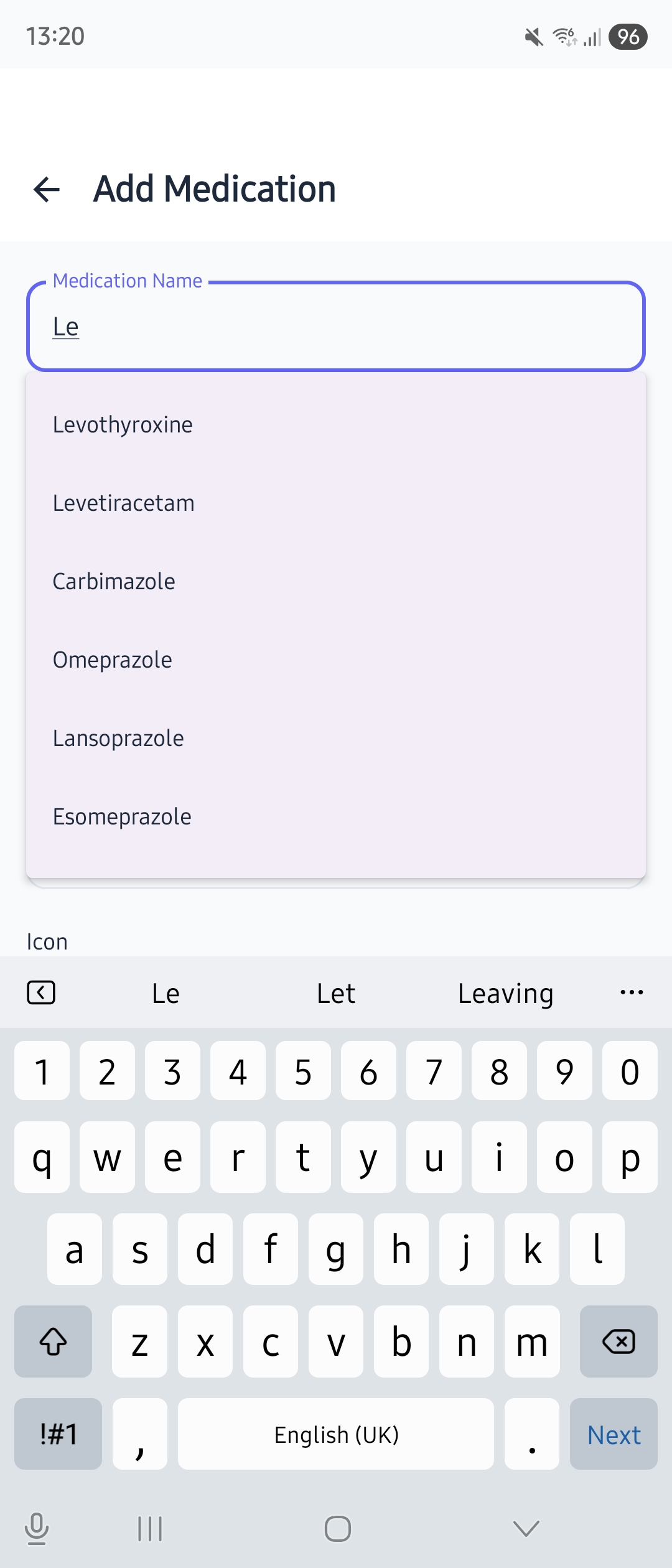
Adding medications should take seconds, not minutes. MedChime includes a built-in medication database with locale-aware suggestions:
- ✓Smart autocomplete — Start typing your medication name and MedChime suggests matches instantly
- ✓UK, US & international — Localised to your region, so you see the names your doctor uses
- ✓Works offline — The database is built into the app, not fetched from the internet. Your searches stay private
- ✓Not in the list? No problem — You can always type any medication name manually
Reminders That Actually Work
Getting reminded is the whole point, right? MedChime makes sure you never miss a dose:
- ✓Notification at the right time — Set reminders for any schedule: daily, weekly (pick specific days), or custom times
- ✓Weekly scheduling — Take something only on Monday, Wednesday, and Friday? Pick exactly which days of the week
- ✓One-tap from notification — Mark as “Taken” or “Snooze” without even opening the app
- ✓Snooze when you need it — Not ready? Postpone by 10, 15, or 30 minutes
- ✓Full-screen alarms — For critical medications, enable a full-screen alarm that takes over your display until you respond
- ✓Persistent mode (Pro) — Reminders repeat until you respond, so you never miss a critical dose
- ✓Notification sounds — Choose from Default, Gentle, Bright, Soft, or Silent
Your Day at a Glance
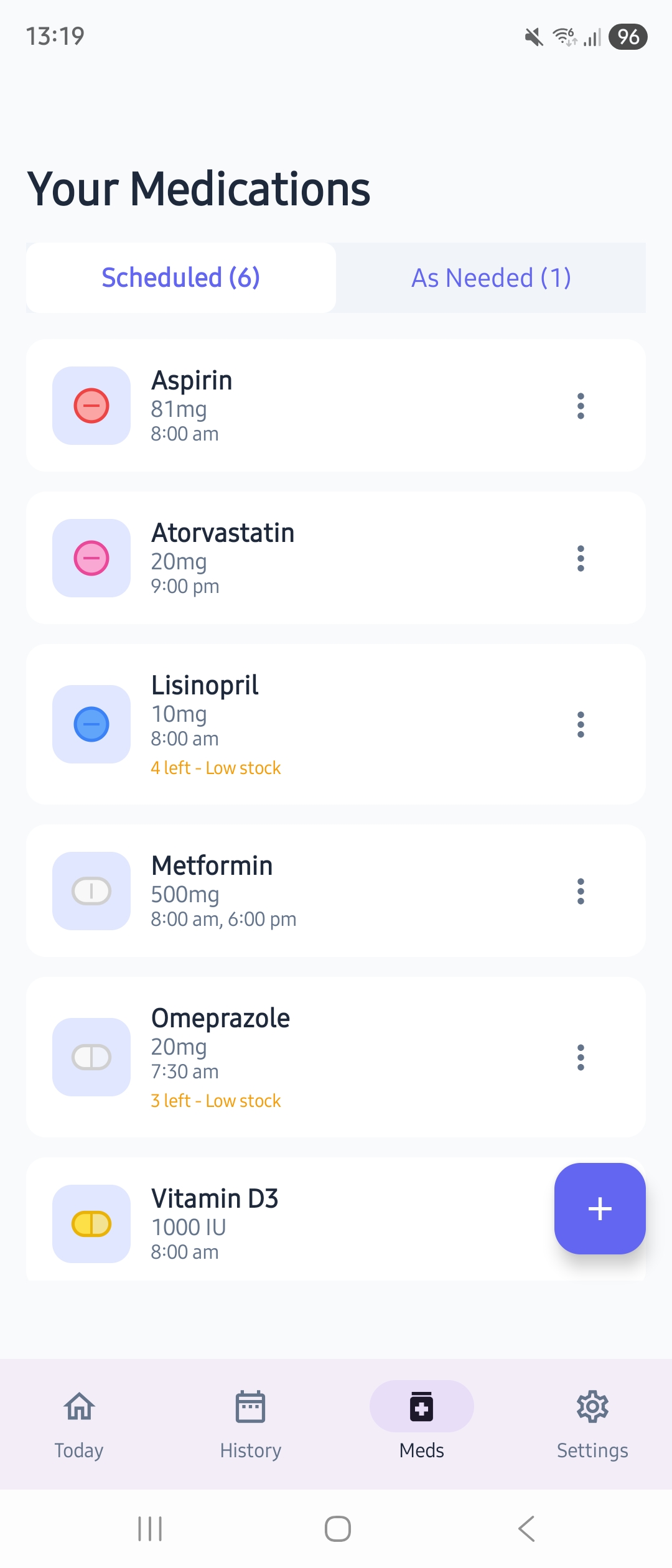
Open MedChime and instantly know where you stand:
- ✓Progress ring — Shows exactly how many doses you’ve taken out of your total for the day
- ✓Organised by time — Morning, Afternoon, Evening, Night sections match how you think
- ✓Smart collapsing — When all medications in a time slot are taken, that section gently collapses to a tidy summary line
- ✓One-tap logging — Tap any medication card to mark it as taken
- ✓Edit time taken — Realised you took it earlier? Long-press any taken dose to correct the logged time
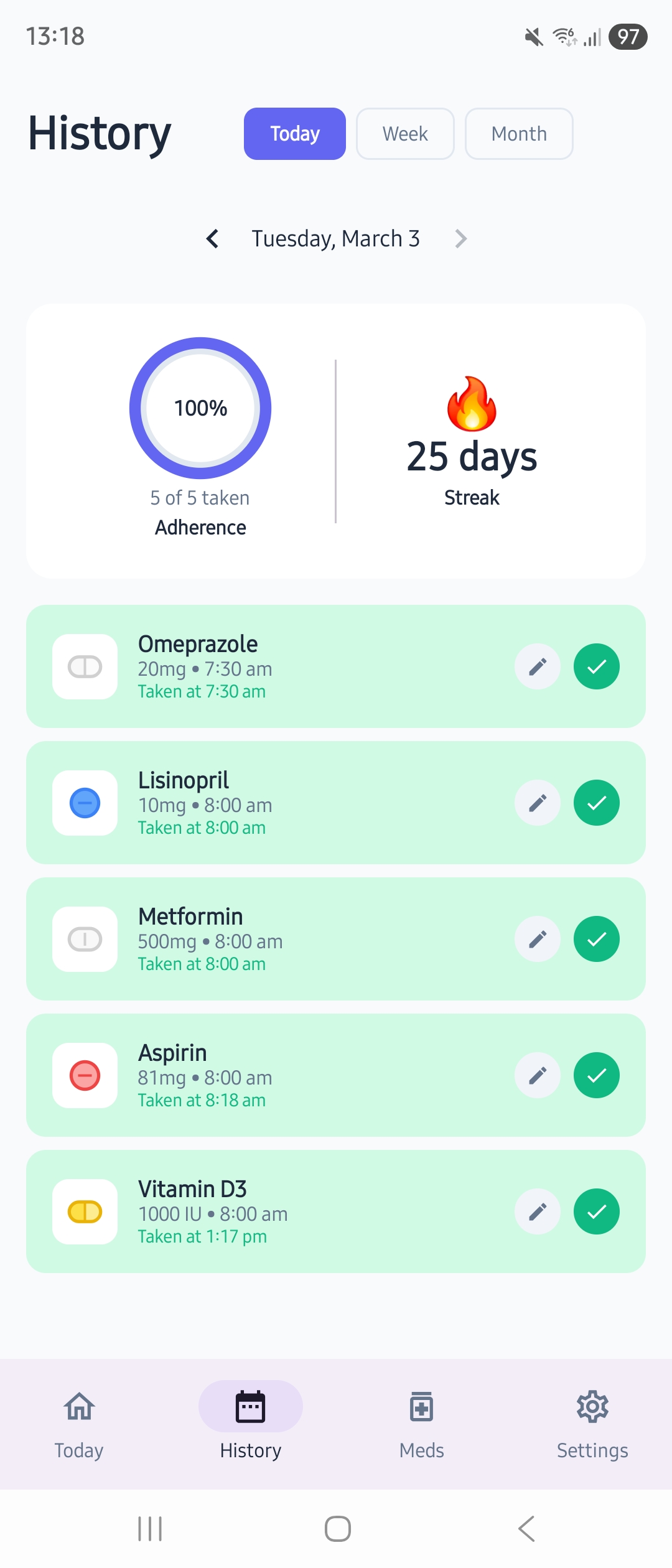
- ✓Visual feedback — Cards turn green with a satisfying checkmark
- ✓Custom icons — Assign pill shapes, colours, and medical device icons to each medication
- ✓Celebration — Complete all your scheduled meds and get a little confetti moment 🎉

Not Every Medication Needs a Reminder
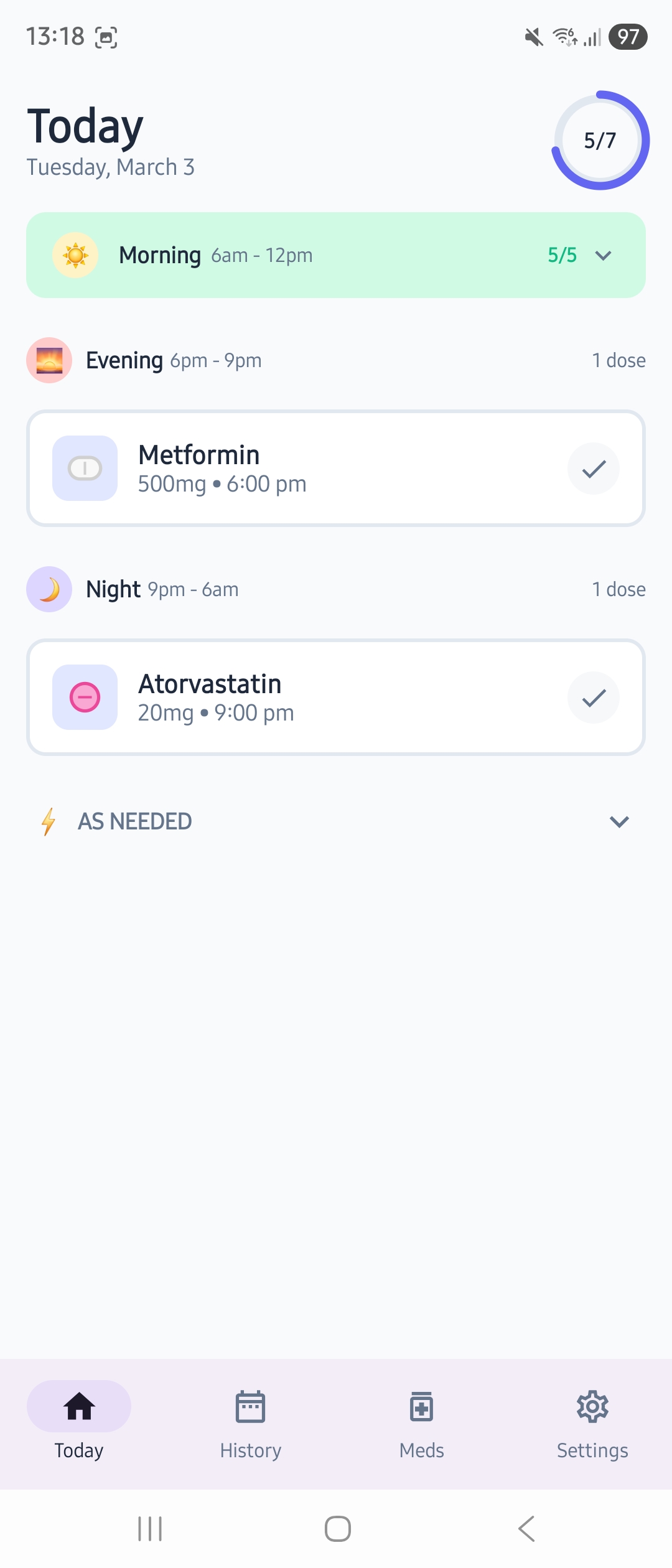
Some medications you take on a schedule. Others — like painkillers, rescue inhalers, or anti-nausea tablets — you take only when you need them.
MedChime handles both:
- ✓Add as “As needed” — Choose this when adding a medication and MedChime skips the reminder setup entirely
- ✓Log with one tap — A simple Log button on the Today screen records the dose and timestamp
- ✓Track usage over time — See how often you’re using each as-needed medication
- ✓Keep it separate — As-needed medications don’t affect your progress ring, streaks, or adherence percentage
- ✓Complete picture for your doctor — Exports include both scheduled and as-needed medications
Never Run Out
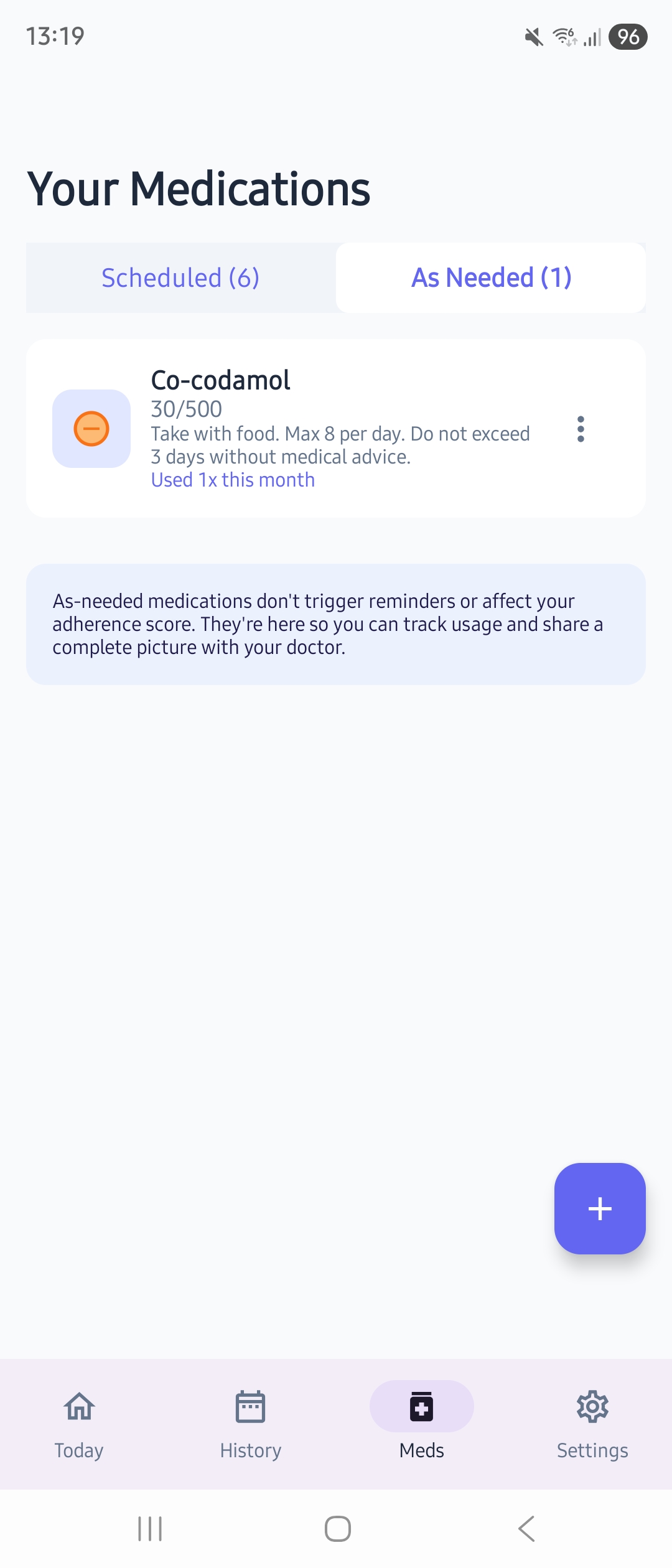
Nothing worse than reaching for your pill bottle and finding it empty:
- ✓Track your supply — Enter how many pills you have when you add a medication
- ✓Auto-decrement — Every time you log a dose, the count goes down
- ✓Low stock alerts — Get notified when you’re running low (default: 7 days supply)
- ✓Refill reminders (Pro) — Set a specific date to remind you to reorder
See Your Patterns
Understanding your habits helps you improve them:
- ✓Week view — Colour-coded daily bars show your adherence at a glance. Tap any day to see exactly what you took or missed
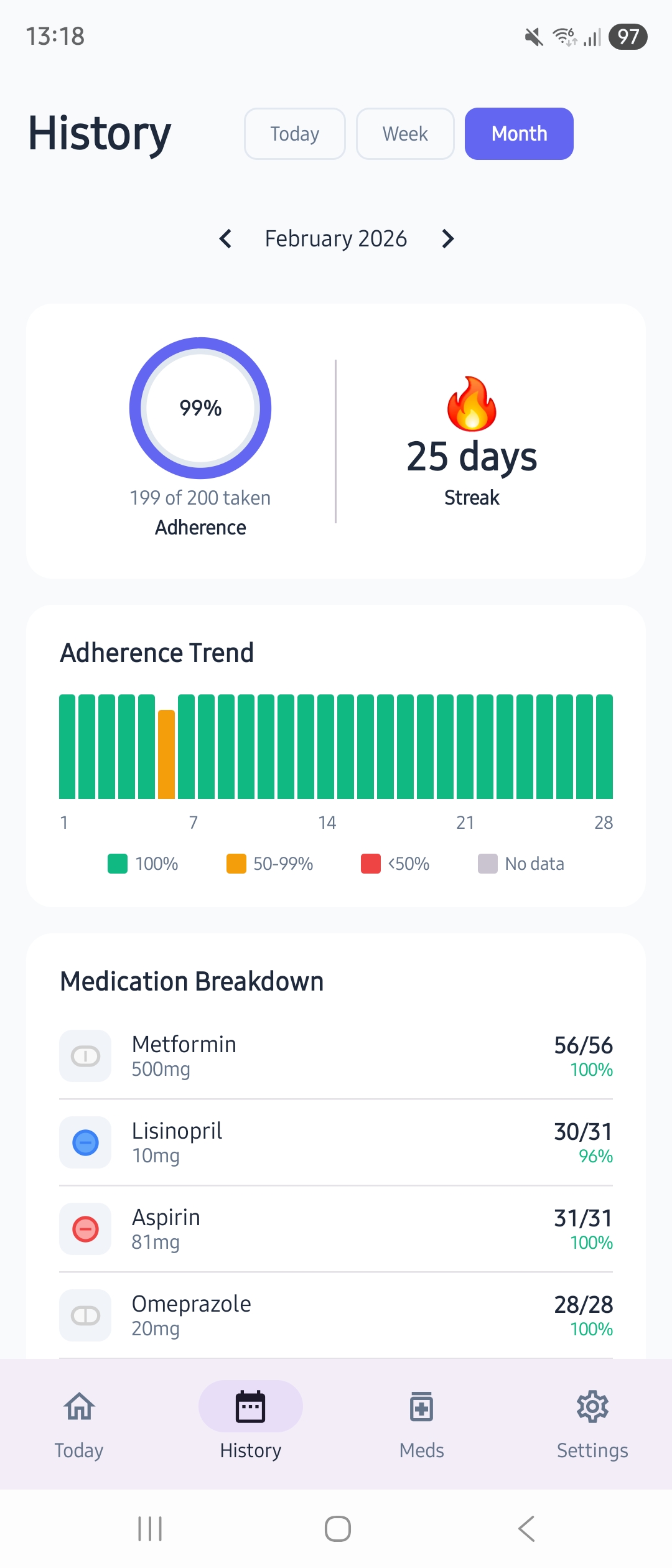
- ✓Month view — The same experience over a full month with day markers and current day highlighted
- ✓Dose history — Select a day and see every dose recorded, with the actual dose amount and time
- ✓Adherence statistics — Basic stats in the free tier, detailed trends in Pro
- ✓Streak counter (Pro) — Track your consistency and celebrate milestones
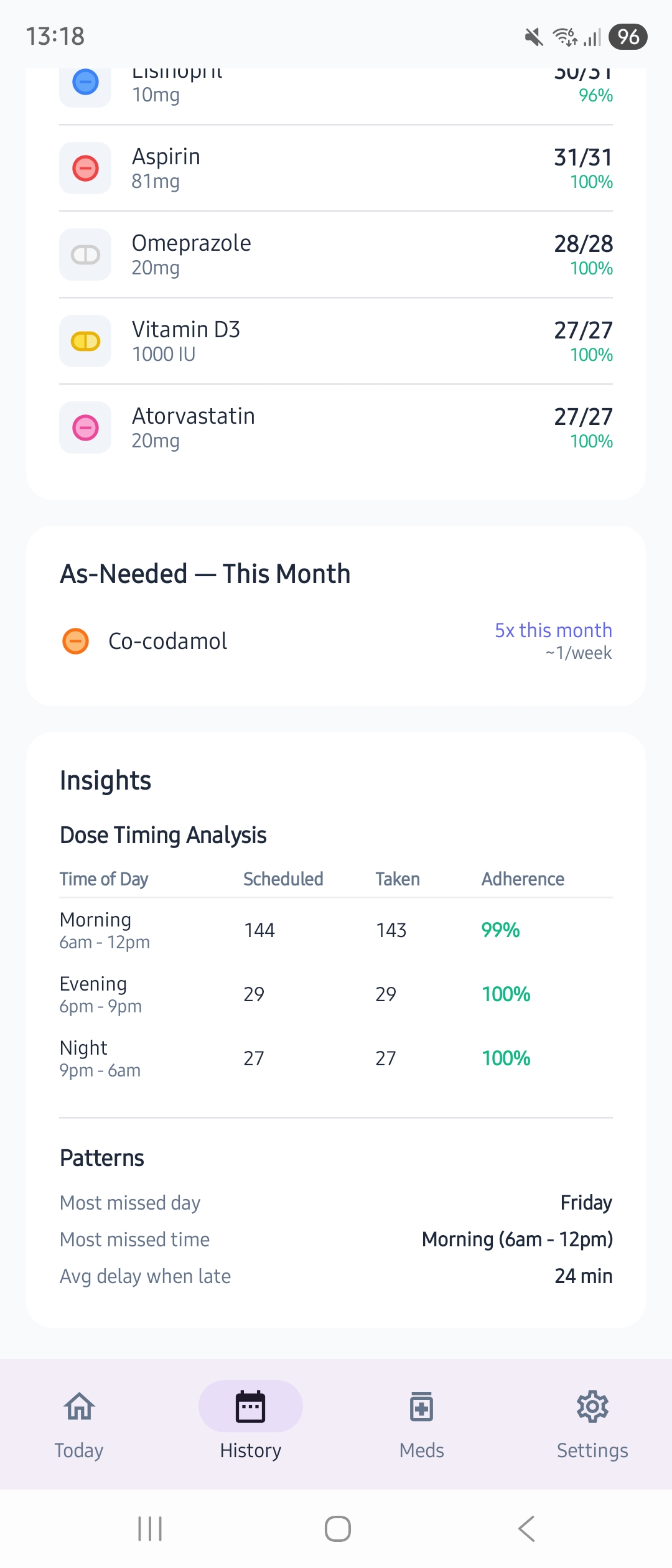
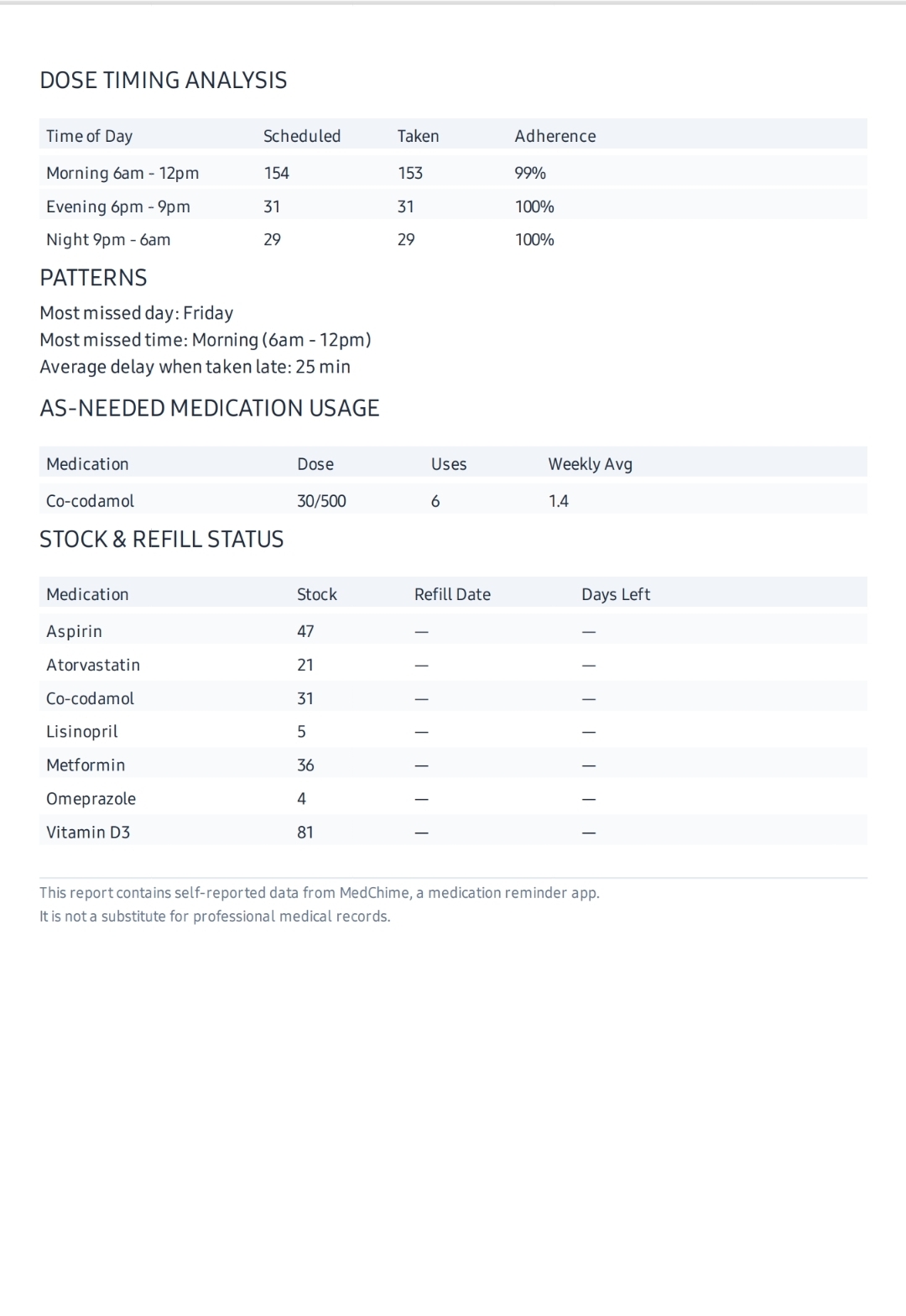
- ✓Insights (Pro) — Dose timing analysis by time of day, most missed day and time, and average delay when taken late
- ✓As-needed usage — Weekly and monthly summaries tracked separately from scheduled adherence
- ✓No judgment — We show the data, not guilt trips
Home Screen Widgets (Pro)
See your medications without even opening the app. Two widget sizes to fit your home screen:
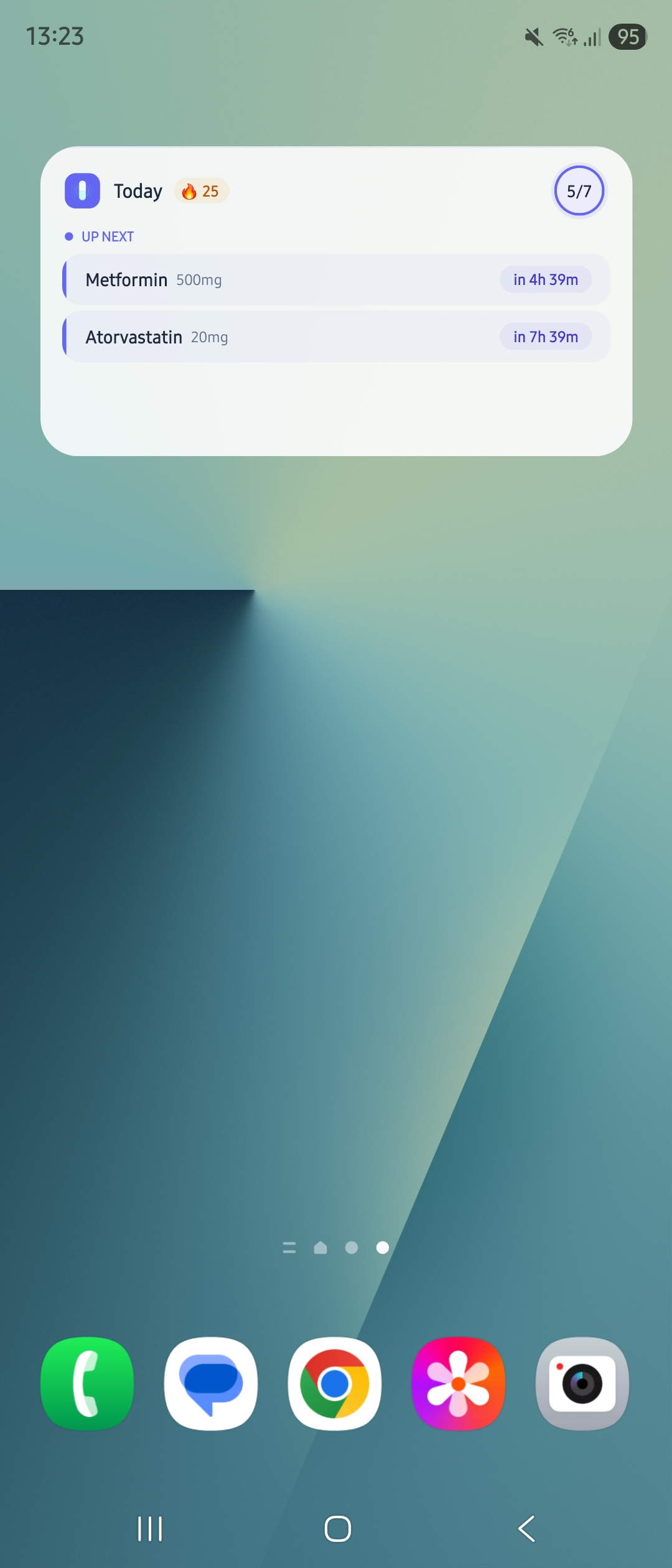
Today at a Glance (4×2)
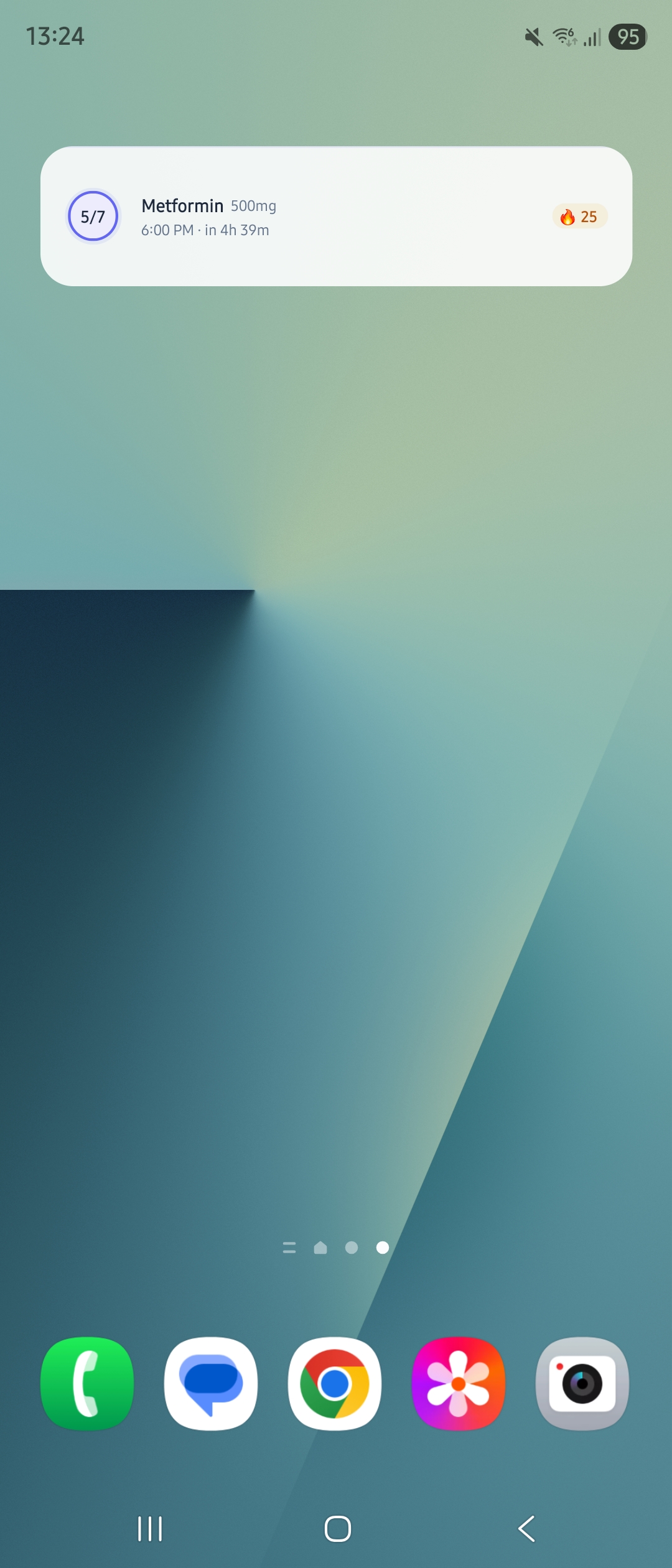
Today — Compact (4×1)
- ✓Today at a Glance (4×2) — See missed and upcoming doses, progress ring, streak counter, and tap to mark taken directly from your home screen
- ✓Today — Compact (4×1) — A single row showing progress, your most urgent medication, and a red dot if anything is missed
- ✓Tap to mark taken — Log doses right from your home screen without opening the app
- ✓Always up to date — Widgets refresh automatically when you mark doses from the app or notifications
- ✓Light & dark mode — Widgets follow your system theme automatically
Multiple People (Pro)
Managing medications for more than just yourself? MedChime Pro lets you add named individuals — a partner, a parent, a child — and manage their medications separately alongside your own.
- ✓Named individual profiles — Add a partner, parent, or child and keep their medications completely separate
- ✓Reminders tell you who they’re for — “Metformin for Margaret — 8:00 AM” so there’s never any confusion
- ✓Per-person history — Adherence tracked individually for each person
- ✓Household view — See everyone’s combined adherence at a glance
- ✓Still completely private — All data stays on your phone. Nothing is shared or synced anywhere
Perfect for couples keeping each other on track, parents managing children’s prescriptions, and adults supporting elderly family members.
Your Data, Your Control
Take your information anywhere you need it:
- ✓Encrypted backup — Save an AES-256-GCM encrypted backup file to your device
- ✓Restore anytime — Moving to a new phone? Restore from backup in seconds
- ✓CSV export (Pro) — Download your complete medication history as a spreadsheet
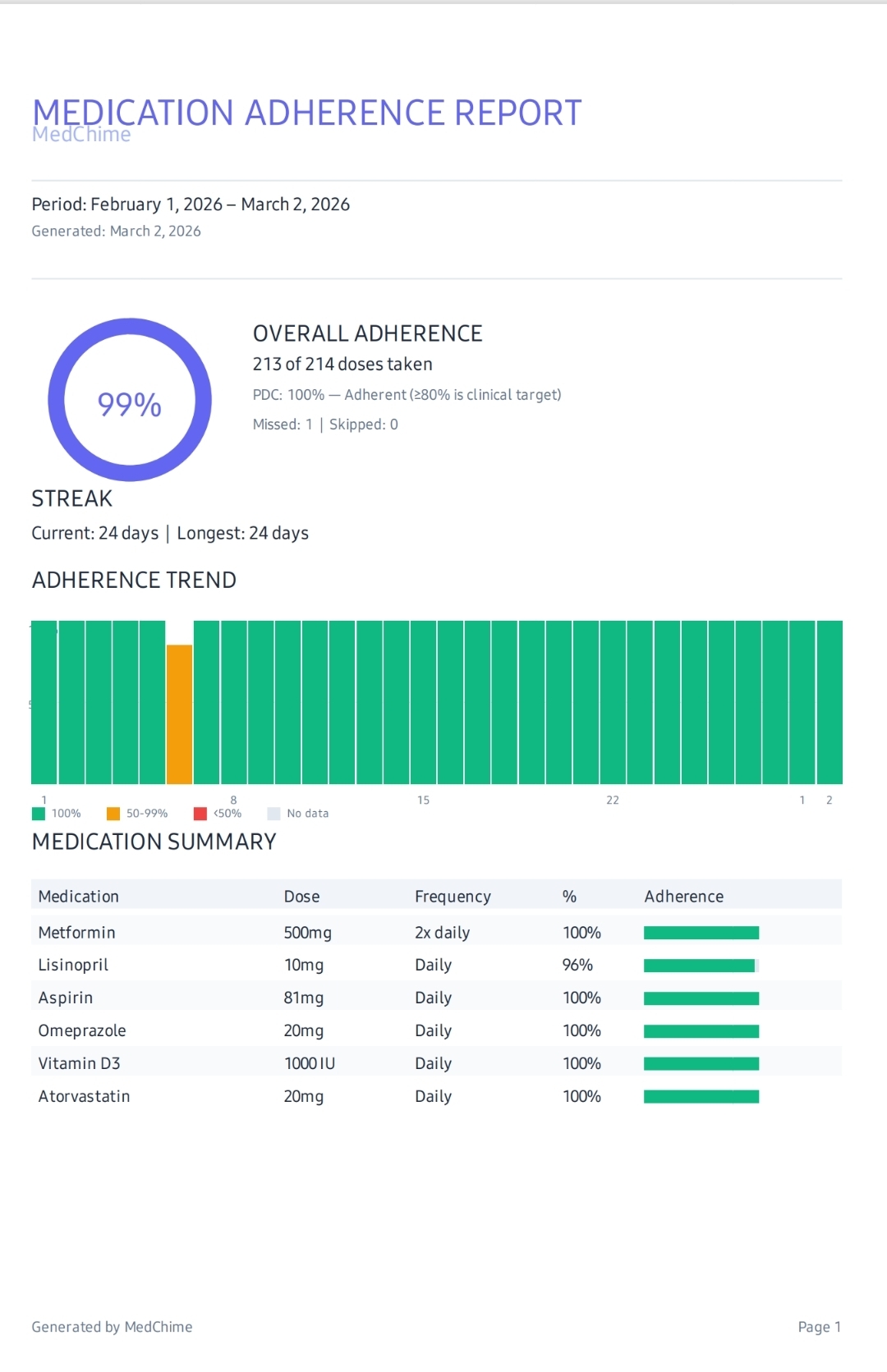
- ✓PDF reports (Pro) — Formatted adherence reports with charts, medication summaries, and dose timing analysis — perfect for doctor visits
Example PDF Report
Example PDF Report Continued
Private by Design, Not by Promise
We didn’t just write a privacy policy. We built privacy into every decision:
- ✓No internet required — Core features work completely offline. The only internet use is Google Play Billing for Pro purchases
- ✓No account needed — Nothing to hack, nothing to leak
- ✓No cloud storage — Your medication data never leaves your device
- ✓No analytics — We don’t track how you use the app
- ✓No ads — Not even in the free version
- ✓No data sales — We make money from the app, not from you
Free vs Pro
⚠️ Important: MedChime is a Reminder Tool, Not a Medical Device
MedChime is designed to help you stay on schedule with medications prescribed or recommended by your doctor. It does not provide medical advice, diagnose conditions, or replace the guidance of a qualified healthcare professional.
Reminder delivery depends on your device’s notification settings and cannot be guaranteed in all circumstances. Never rely solely on any app as your only safeguard for taking critical medications. Always consult your doctor or pharmacist with any questions about your medication regimen.
If you are experiencing a medical emergency, contact emergency services immediately — do not rely on this app.

Ready to Try It?
Download MedChime and set up your first medication in under a minute.
No sign-up. No credit card. Just download and start.